PremierGuard gives guard-staffing agencies an AI assistant their guards can text, mobile timecards that match the paper form, and incident reporting that never gets lost — so posts stay covered and payroll stays accurate.
This page exists specifically so that A2P 10DLC campaign reviewers can independently verify the business, messaging program, and complete Call-to-Action / consent mechanics for PremierGuard operational SMS without any login or employment credentials.
SMS opt-in is optional and is not required to sign in or use PremierGuard (schedule, timecards, incident reporting). Agreeing to receive messages is never a condition of access.
Optional SMS
SMS opt-in is optional — not required to sign in or use schedule, timecards, or incident reporting.
Standalone consent
Unchecked checkbox, disabled button until checked — never bundled into Terms or Privacy.
Public evidence
All links, sample messages, and mechanics are HTTPS-accessible with no login.
Business & Program Identity
Varanguard Consulting LLC (“Varanguard”), Los Angeles, California, info@varanguard.com. Varanguard operates PremierGuard, an internal staff application used exclusively by W-2 employed security guards of the security-staffing company using PremierGuard. There are no public users and no public sign-up or registration path.
This messaging program is strictly operational only — never marketing or promotional. Messages are limited to shift-related coordination, timekeeping, break reminders, schedule updates, incident reporting, and account notifications for enrolled employed guards.
Exact 5-Step Opt-In Workflow
The following workflow, and the exact on-screen language, is what appears in the live PremierGuard application and matches the text submitted in the Twilio A2P 10DLC registration.
Enter a mobile number and check the consent box (it is not pre-selected).
Tap Send verification code.
Enter the one-time code we text to confirm — this completes opt-in.
Critical Mechanical Proof Points
These safeguards are visible on the opt-in screen itself:
Standalone consent — never bundled into Terms or Privacy.
Checkbox is unchecked by default.
Send verification code button is disabled until the consent box is checked. Helper text: “Disabled until the consent box above is checked.”
Full required disclosures on the form: message type, “Message frequency varies”, “Message and data rates may apply”, “Reply STOP to opt out or HELP for help”.
Privacy Policy and Terms and Conditions links are visible on the opt-in screen itself.
Hosted Verification Screenshots
SMS opt-in is optional and is not required to sign in or use PremierGuard (schedule, timecards, incident reporting). The opt-in screenshot below shows this language on the live form.
These static assets are public, HTTPS, and open as raw image files with no login. Click any image for the full-resolution file (ready for Twilio “Opt-in policy proof” / optInImageUrls).
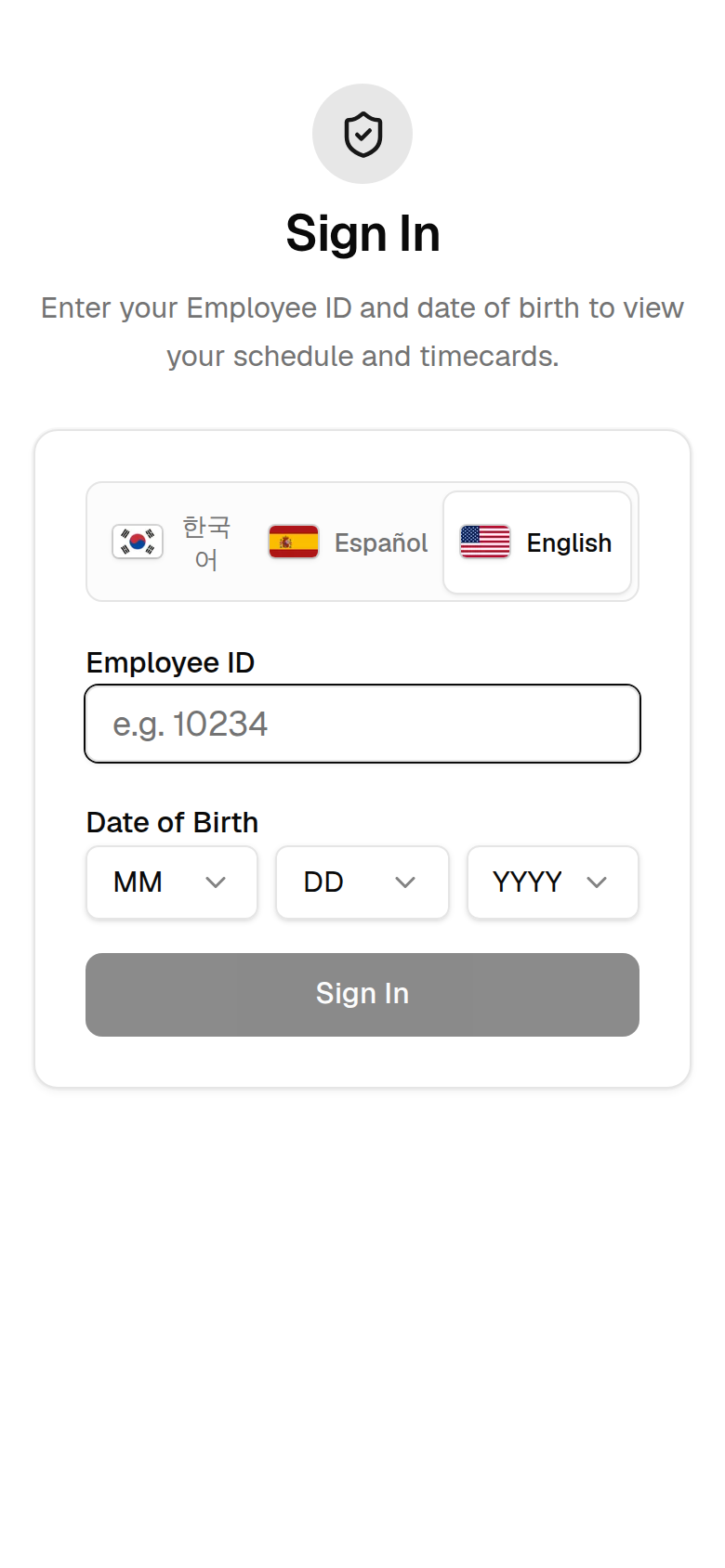
Sign-in screen (live app). Access requires employee ID + date of birth. There is no public sign-up or registration path.
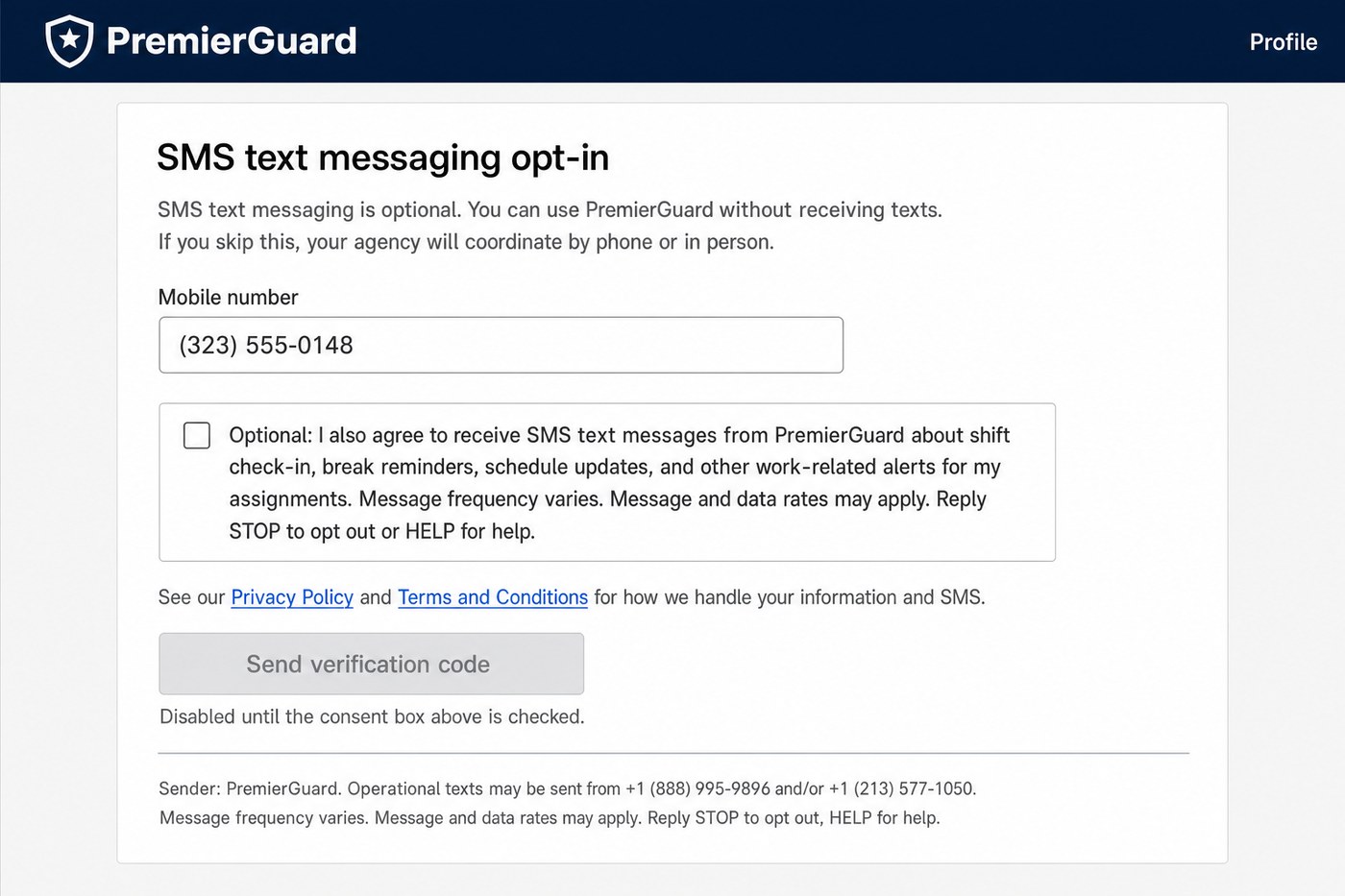
Open raw image →Profile → SMS text messaging opt-in. Shows the optional intro, “Optional: I also agree…” consent checkbox unchecked by default, “Send verification code” disabled until checked, Privacy Policy and Terms links, and PremierGuard sender disclosure (+1 (888) 995-9896 and/or +1 (213) 577-1050).
Open raw image →
Exact consent checkbox language shown to the user (standalone; not buried in Terms/Privacy): “Optional: I also agree to receive SMS text messages from PremierGuard about shift check-in, break reminders, schedule updates, and other work-related alerts for my assignments. Message frequency varies. Message and data rates may apply. Reply STOP to opt out or HELP for help.”
Direct URLs for Twilio paste:
https://www.varanguard.com/assets/images/premierguard-a2p/premierguard-signin-live.jpg
https://www.varanguard.com/assets/images/premierguard-a2p/premierguard-sms-optin-optional.jpg
Verification / Opt-In Confirmation SMS
Exact text sent after the guard taps Send verification code:
PremierGuard: your verification code is 123456 (expires in 10 min). Entering this code confirms your opt-in to shift-related SMS text messages. Message frequency varies. Message and data rates may apply. Reply HELP for help, STOP to opt out.
Opt-Out Workflow
Reply to any PremierGuard message with any of these keywords (case-insensitive). We immediately stop all further messages and send a confirmation including the brand name “PremierGuard” and contact information.
STOPOPTOUTCANCELENDQUITUNSUBSCRIBEREVOKESTOPALL
Help / Info Workflow
Replying HELP or INFO returns a response with the brand name, operational program description, frequency/rates note, and contact details (info@varanguard.com and the originating +1 numbers).
Third-Party Data Policy
No mobile information, SMS opt-in, or consent data is shared with or sold to third parties, affiliates, or lead generators for marketing or promotional purposes.
Voluntary Nature of Consent
Opting in to PremierGuard SMS is optional and is not required to create access, sign in, or use the rest of the PremierGuard application. Guards who do not opt in, or who later reply STOP, retain full access to scheduling, timecards, incident reporting, etc. The agency coordinates with them by phone or in person instead.
All verification assets, links, phone numbers, sample messages, and on-screen mechanics on this page are publicly accessible over HTTPS and match the Twilio A2P 10DLC campaign registration.
What it is
One system for the agency, the guard, and the site
Security staffing runs on a hundred moving parts — open posts, last-minute call-offs, paper timecards, and incident reports scattered across texts and clipboards. PremierGuard pulls all of it into a single platform that connects three views of the same operation.
Guards sign in on their phone, see their schedule, track hours, and report incidents.
Agency owners manage the roster, match guards to shifts, approve timecards, and run the exchange.
Client sites post the coverage they need and approve the hours worked.
Guards sign in with an employee ID — no app store, no password to forget — and land on a clean, mobile-first view of their schedule, hours, and incident log.
Sign in
Employee ID + date of birth, in three languages
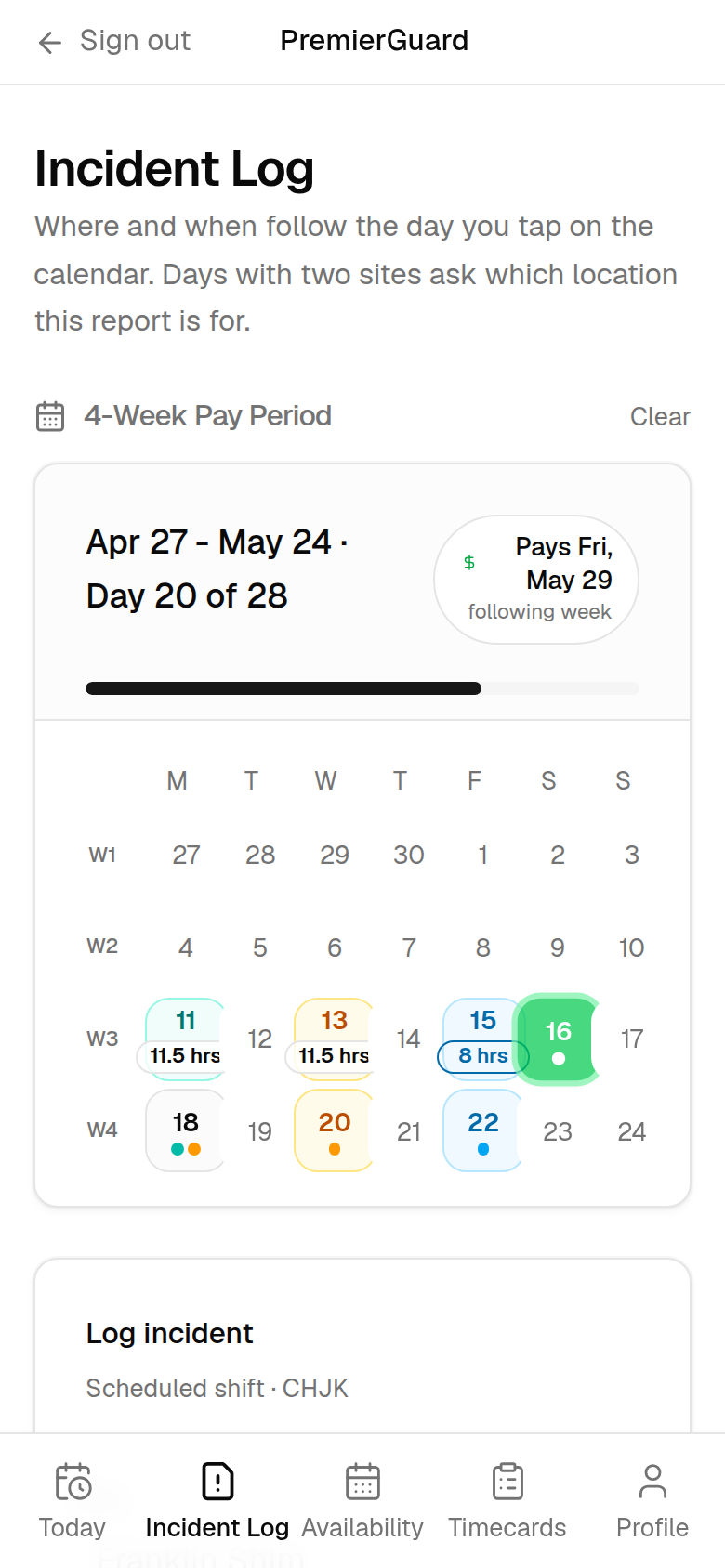
Today & pay period
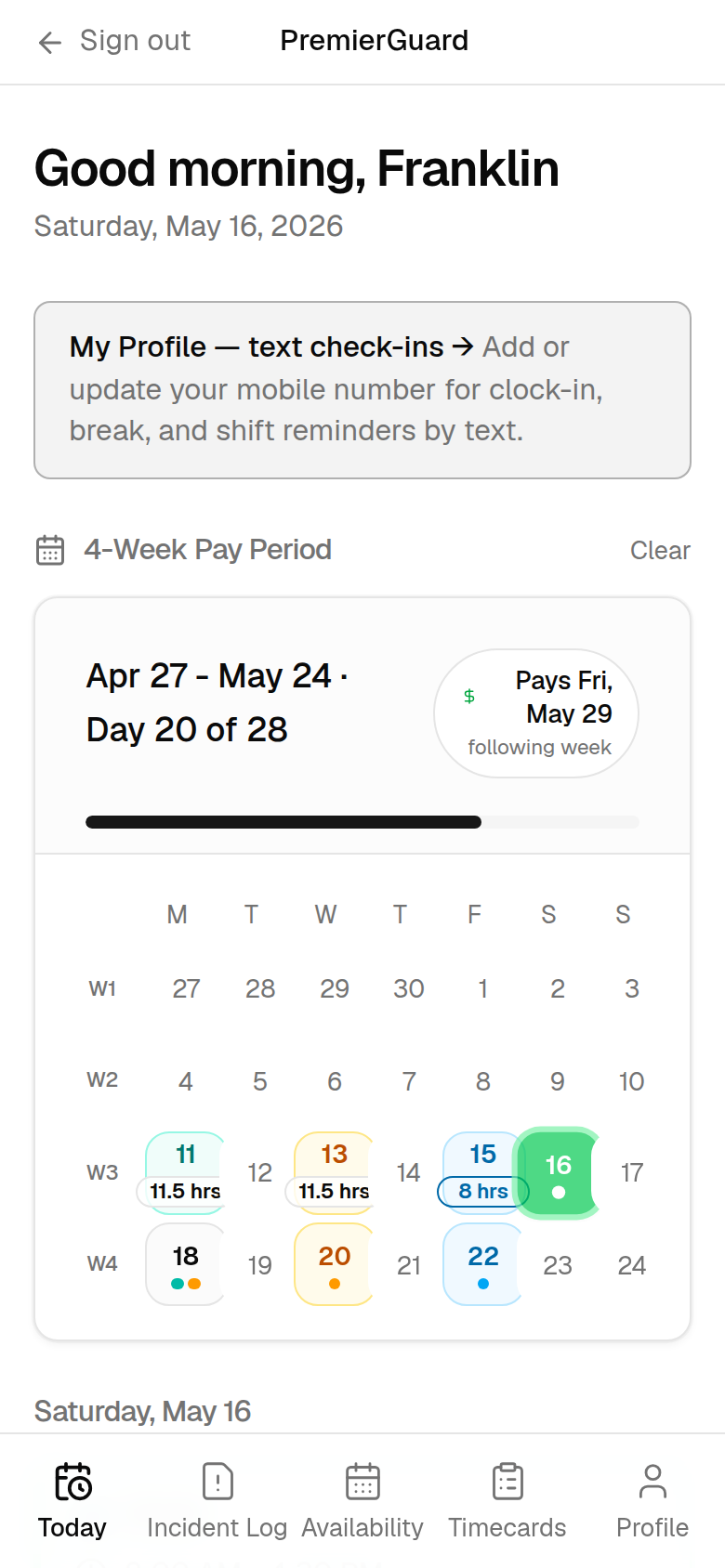
A 4-week calendar with hours toward each payday
Incident log
Structured safety & police-report capture
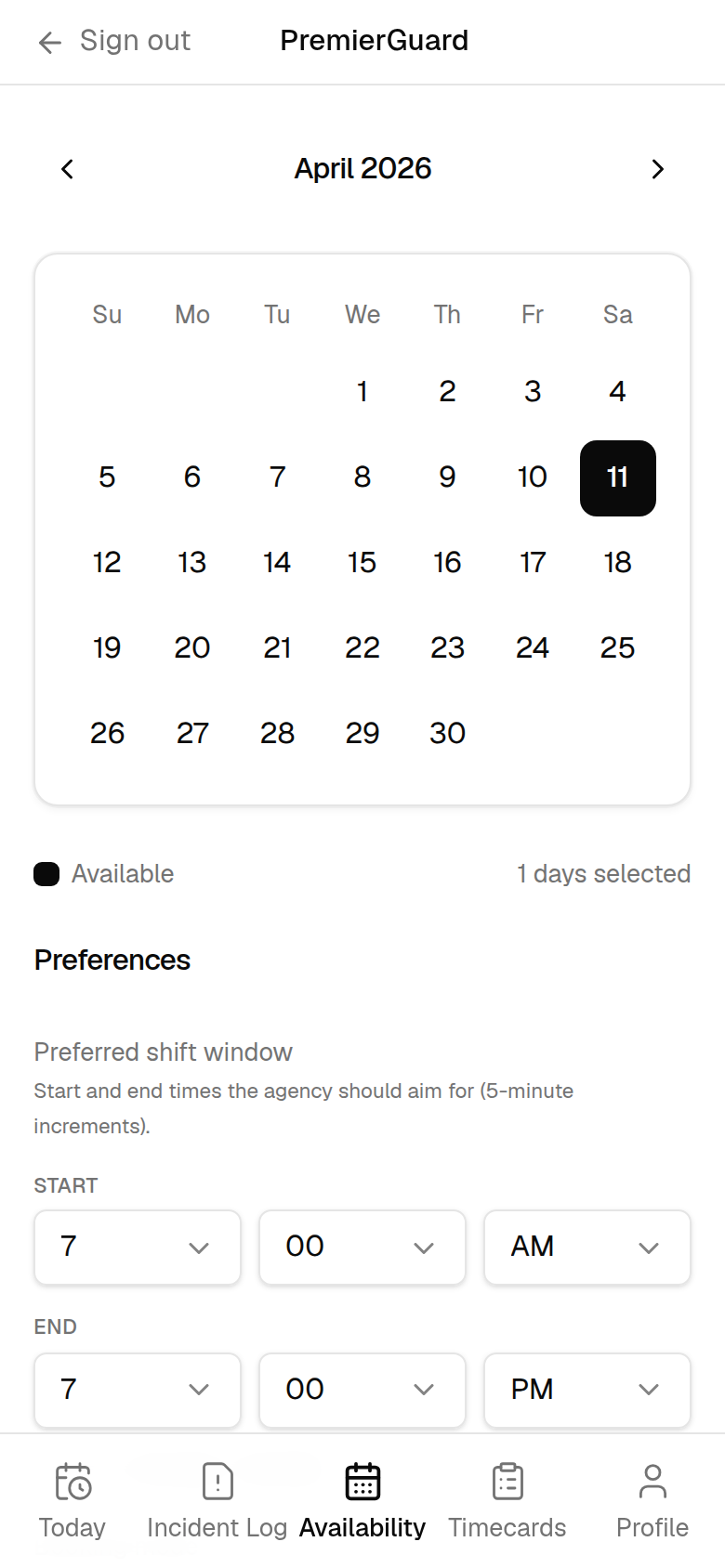
Availability
Tap the days and shifts they can work
Flagship features
Everything a guard agency runs on
Purpose-built for the way security staffing actually works — from the field to the back office.
Flagship
AI assistant over SMS
Guards text in plain language to clock in and out, log breaks, set availability, and start an incident report. The assistant understands their schedule, replies in English, Spanish, or Korean, and hands off to a human when needed.
Pay-period scheduling
A four-week pay-period calendar shows every guard their shifts, worked hours, time-off and over-time, and the days remaining until their next payday — all on one screen.
Digital timecards
Time in, lunch, and time out mirror the paper form your guards already know. Cards move from draft to submitted to approved, then sync downstream — no more chasing illegible sheets.
Incident reporting
Capture what happened, how it was handled, witnesses, firearm discharge, and police-report details — over SMS with the assistant or on the web form. Every report routes to the agency for review.
Availability & matching
Guards mark the days and shift windows they can work; the agency sees availability against open posts and assigns the right guard — manually or with the optimizer.
Network effect
Cross-agency exchange
Can't fill a post? Claim a guard another agency has posted spare. Have surplus? List it. The home agency earns a wholesale rate, the filling agency bills its client — and the post gets covered.
Smart shift optimizer
A solver matches surplus guards to unfilled shifts across the network to maximize coverage and margin — with a quantum-ready path (Amazon Braket) for when the network scales.
Reputation & payments
Track which client sites fill, cancel, dispute, and — crucially — pay on time. Reputation and payment-reliability scores flag risk before you commit guards to a site.
PremierGuard Assistant
Starting my shift at Woodland now 7:58 AM
Got it, Franklin — clocked you in at Woodland at 7:58 AM. Have a good shift. 7:58 AM
Need to report something. Someone tried a side door around 2.2:14 PM
I'll start an incident report. Was anyone hurt, and did you contact police? 2:14 PM
Flagship feature
An assistant your guards can just text
Most field guards won't log into a dashboard — but everyone can send a text. PremierGuard's assistant turns plain-language messages into clean, structured records.
Clock in/out, breaks, and availability — captured from natural language
Guided incident reports that collect every required field
Replies in English, Spanish, or Korean — the guard's choice
The agency can step in mid-conversation, with verified opt-in for compliance
Security-grade by design
Made for what happens on the post
When something happens on a shift, PremierGuard captures it the right way — structured, time-stamped, and sent straight to the agency. No more incident details lost in a group text or a glovebox notebook.
Incident reports with firearm-discharge, witness, and police-report fields
Captured over SMS with the assistant, or on the web form
Every report time-stamped and routed to the agency for review
TCPA-compliant verified opt-in before any proactive text
SMS opt-in
How guards opt in to text messages
Employed security guards opt in inside the PremierGuard web app. There is no public sign-up and no keyword flow; consent is explicit, standalone, and verified before any proactive work-related text is sent.
For the complete TFV / A2P reviewer evidence package (including hosted screenshots), see the compliance verification section above. The interactive consent screen mockup below matches the live app language.
A verified five-step workflow
The consent path keeps messaging permission separate from every other agreement and makes the disabled state visible before the checkbox is selected.
Enter a mobile number and check the consent box (it is not pre-selected).
Tap Send verification code.
Enter the one-time code we text to confirm — this completes opt-in.
Standalone consent is never bundled into Terms or Privacy.
Unchecked by default with a disabled verification button.
One-time code verifies the number before operational texts start.
Sender disclosure names PremierGuard.
Sender: PremierGuard. Operational texts may be sent from +1 (888) 995-9896 and/or +1 (213) 577-1050. Reply STOP to opt out, HELP for help, or email info@varanguard.com. Texting these numbers is for reference only — guards opt in through the app screen shown here, not by texting a keyword.
PremierGuard
Profile
SMS text messaging opt-in
SMS text messaging is optional. You can use PremierGuard without receiving texts. If you skip this, your agency will coordinate by phone or in person.
Sender: PremierGuard. Operational texts may be sent from +1 (888) 995-9896 and/or +1 (213) 577-1050. Message frequency varies. Message and data rates may apply. Reply STOP to opt out, HELP for help.
Illustration of the actual consent screen guards see in the PremierGuard app.
Confirmation text after opt-in
After a guard checks the consent box and taps Send verification code, we text a one-time verification code to the number they entered. Entering that code in the app completes opt-in and confirms enrollment in PremierGuard operational SMS.
The verification text includes message frequency, “Message and data rates may apply,” and instructions to reply HELP for help or STOP to opt out. Example:
PremierGuard: your verification code is 123456 (expires in 10 min). Entering this code confirms your opt-in to shift-related SMS text messages. Message frequency varies. Message and data rates may apply. Reply HELP for help, STOP to opt out.
Internal staff app only. PremierGuard has no public users. Guards who do not opt in, or who later reply STOP, are coordinated with by phone or in person instead. No mobile information, SMS opt-in, or consent data is shared with or sold to third parties or affiliates for marketing. PremierGuard is operated by Varanguard Consulting LLC.
How it works
Three connected surfaces, one source of truth
Everyone sees the same live data from their own point of view — no double entry, no stale spreadsheets.
01
The guard
Signs in on a phone, checks their pay-period schedule, tracks hours, sets availability, and reports incidents — or just texts the assistant.
02
The agency
Sees the full roster and every open post, matches guards to shifts, approves timecards, monitors AI conversations, reviews incidents, and runs the exchange.
03
The client site
Posts the coverage it needs and approves the hours guards actually worked — closing the loop on billing and payment.
Who it's for
Built for the people who keep sites covered
Staffing agency owners
The primary buyer. Place guards faster, keep timecards accurate, cut the back-office paperwork, and fill more posts through the exchange.
Field guards
A mobile-first experience that works the way they do — sign in with an employee ID, text to clock in, and report incidents from the post, in their own language.
Client sites
Properties and facilities that need reliable coverage — post shift needs, approve hours, and build a track record that reflects how they actually operate.
One platform, two markets. The same scheduling, timecard, exchange, and matching engine behind PremierGuard also powers SuperShift, our platform for medical staffing agencies placing nurse practitioners. Same core, tuned for your industry.
Under the hood
Modern, reliable, and built to integrate
Engineered by Varanguard on a proven, cloud-native stack — and ready to connect to the tools you already run on.
Twilio SMS Claude AI assistant Amazon Braket (quantum-ready) PostgreSQL Next.js on Vercel TCPA-compliant opt-in
See PremierGuard in action
PremierGuard is a Varanguard product. Tell us about your guard force and we'll walk you through a live demo — and how it can fit your agency.